Scientific Calculator Precision 721.0.1.5
Publisher Description
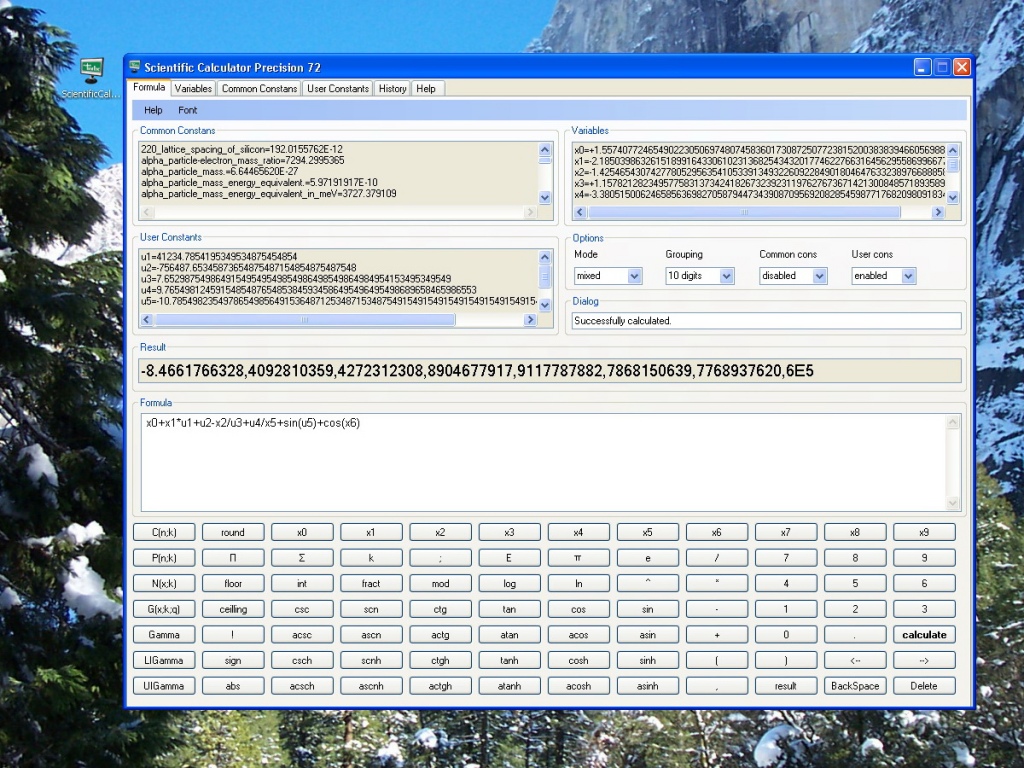
A handy, fast, reliable, precise tool if you need to perform complex mathematical calculations. Scientific Calculator Precision 72 is programmed in C#. All calculations are done in proprietary data type. The calculator handles mathematical formulas of any length and complexity. Calculation history can be stored into text file or printed. There are ten variables or constants available for storing often used numbers. Prebuilt Common Costants list with fundamental constants. Unlimited User Constants list. Precision of calculations is 72 digits. Trigonometric, hyperbolic, inverse and combinatorial functions. Special numbers NaN, Uncertainty, and Infinity. The calculator follows classical approach when uncertainty of f(x) calculation is estimated by formula max|(derivative(f))|*|x*uncertainty(x)|, where maximum of function derivative is considered on interval [x-uncertainty(x),|x+uncertainty(x)], and uncertainty(x)=|x|*10^(-precision). Gamma function, Lower Incomplete Gamma function, Upper Incomplete Gamma function.
About Scientific Calculator Precision 72
This Mathematics program is available in English. It was last updated on 29 September, 2026. Scientific Calculator Precision 72 is compatible with the following operating systems: Windows.
The company that develops Scientific Calculator Precision 72 is Tvalx. The latest version released by its developer is 1.0.1.5. This version was rated by 1 users of our site and has an average rating of 5.0.
The download we have available for Scientific Calculator Precision 72 has a file size of 2.1 MB. Just click the green Download button above to start the downloading process. The program is listed on our website since 2012-12-05 and was downloaded 160 times. We have already checked if the download link is safe, however for your own protection we recommend that you scan the downloaded software with your antivirus. Your antivirus may detect the Scientific Calculator Precision 72 as malware if the download link is broken.
How to install Scientific Calculator Precision 72 on your Windows device:
- Click on the Download button on our website. This will start the download from the website of the developer.
- Once the Scientific Calculator Precision 72 is downloaded click on it to start the setup process (assuming you are on a desktop computer).
- When the installation is finished you should be able to see and run the program.
Program Details
System requirements
Download information
Pricing
Version History
version 1.0.1.5
posted on 2012-12-05
version checker is added
version 1.0.0.5
posted on 2009-04-12
All text-boxes got uniform right-click menus.
